
AABrowser
Screenshots
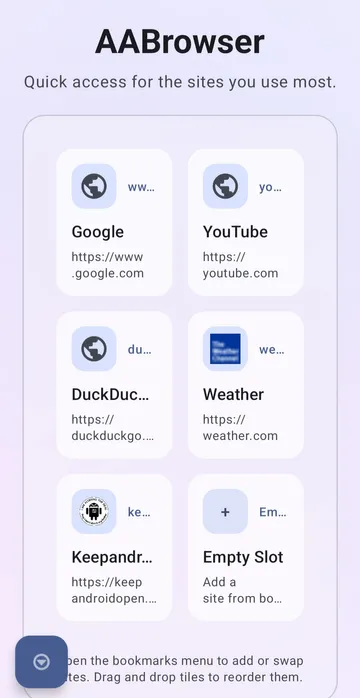
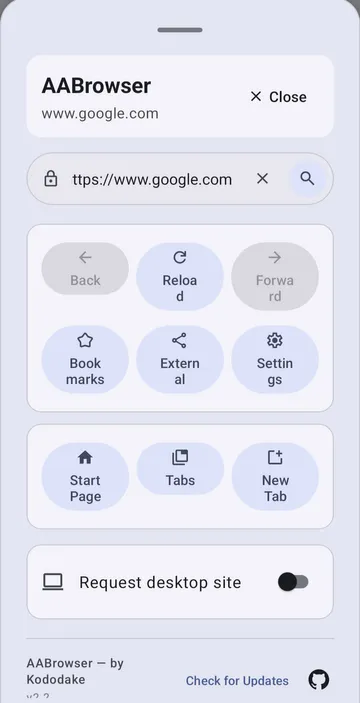
AABrowser transforms your car screen into a functional web browser. You can easily access your favorite websites while you wait in your parked vehicle. Many drivers face boredom during long charging sessions or parking breaks. Therefore, this special web browser offers a great solution for entertainment. You can browse articles, stream media, or check the news directly from your dashboard display. The user interface matches the needs of a vehicle screen perfectly.
Furthermore, the large buttons make navigation simple and precise. You do not need to struggle with small mobile links while sitting in your car. Instead, you get a clean start page with large customizable shortcuts. This article explains the features, installation steps, and benefits of this tool. Read further to discover how this open-source tool changes your travel experience. Then, you can download the APK file to upgrade your system.
Many modern vehicles include large touch displays. However, standard software often limits your browsing options. Manufacturers restrict web access to keep systems locked. Because of these restrictions, independent developers created a unique alternative. AABrowser fills this gap by allowing full internet access on your vehicle monitor. Consequently, passengers can enjoy videos during long road trips. You can also manage multiple open tabs easily through the built-in system. The tool works seamlessly on standard mobile devices too. But it shows its true potential on a larger dashboard monitor.
What is AABrowser?
AABrowser is an open-source web browser designed specifically for vehicle infotainment systems. It modifies the traditional internet browsing experience to fit larger automotive touchscreens. The developer built this software to utilize the Android Auto interface framework. Therefore, it mirrors your phone’s web connectivity directly onto the console screen. You can access the full desktop or mobile versions of websites with a quick toggle. This means you are not limited to basic mobile layouts.
Additionally, the app prioritizes user privacy through a transparency-first policy. It does not track your URL history or monitor your search entries. The developer uses private, self-hosted analytics tools instead of big tech trackers. Because of this setup, your data stays entirely anonymous and private. You do not have to worry about advertising companies stealing your data. Then, you can enjoy a safe, track-free internet session on the road. AABrowser provides a clean environment for everyone who values digital safety.
Furthermore, the layout avoids unnecessary clutter. The home page contains six quick-link cards for rapid website loading. You can modify these cards to match your personal preferences. For example, you can add your favorite streaming platform or news site. Consequently, you save time because you do not type long web addresses manually. Many users prefer open-source software because it offers clear visibility of the inner code. Independent communities regularly check the software code for potential errors. This collaborative effort guarantees a highly stable browsing environment. Therefore, you receive a secure product that updates continuously over time. You can rely on this tool for daily internet activities without hesitation.
Key Features of the Car Web Browser
This software includes several unique options that improve your viewing experience. First, it uses a glassmorphic aesthetic for a modern look. The smooth, frosted-glass panels blend perfectly with your chosen background wallpaper. Therefore, the visual interface matches premium car interiors easily. Second, you can reorder your shortcuts with simple drag-and-drop actions. This interaction allows you to organize your tabs, bookmarks, and links instantly.
Furthermore, the app supports global display scaling settings. You can adjust the size of the text and images together. This option is helpful because vehicle screens have different resolutions. If the text looks too small, you can increase the percentage easily. Alternatively, you can shrink the interface to see more page content. Then, the browser fits your exact dashboard dimensions perfectly.
Additionally, the software features a smart desktop mode toggle. Some websites look better when they render in a desktop view. You can switch to this mode with a single tap on the toolbar. The local cache stores site icons to speed up future loading times. Because of this feature, the start page loads instantly without extra data use. You also get full microphone support for voice commands on compatible sites.
The dynamic background rendering engine prevents system crashes during heavy usage. You can upload high-resolution images to decorate your home interface. However, the app optimizes these images automatically to save precious memory. Consequently, the system performance remains incredibly fast and fluid. You can switch between multiple open tabs without experiencing slow animations.
How to Install AABrowser APK
Installing the AABrowser APK requires a few specific steps on your mobile device. Because this tool is not on standard commercial stores, you must install it manually. First, you need to download the official file from a trusted source. Then, open your device settings to allow installations from unknown sources. This permission allows your system to process third-party installer files safely. However, you must also configure the vehicle connection settings properly.
Follow these specific instructions to enable the browser on your car screen:
- Open the settings on your phone and find the vehicle connection menu.
- Scroll down to the bottom and locate the software version section.
- Tap the version information ten times continuously to unlock developer mode.
- Open the developer options from the top-right three-dot menu.
- Locate the checkbox for unknown sources and turn it on.
- Launch your launcher customization menu to activate the new browser icon.
After completing these steps, connect your phone to the car console. The new icon will appear on your vehicle dashboard display immediately. Consequently, you can open AABrowser and start searching the web right away. If the app fails to start, launch a navigation app like Waze first. Then, open the browser again to clear any minor system conflicts. This manual installation process bypasses unnecessary restrictions from corporate store platforms. Therefore, you gain complete freedom over the software choices on your device. Make sure you download the correct package format for your specific architecture. Then, you can enjoy an uninterrupted setup experience without unexpected errors.
Why Drivers Prefer a Specialized In-Car Interface
Standard mobile web software fails to perform well on a vehicle dashboard. The text is usually too small, and buttons are hard to press. Therefore, drivers need a tool built for touch screens in vehicles. This custom tool provides an optimized layout with enormous touch targets. Consequently, passengers can select links without making mistakes while parked. The persistent address bar stays visible at the top for faster navigation.
Furthermore, traditional browsers use heavy tracking scripts that slow down performance. This specialized software runs on a lightweight engine to preserve system memory. Because it uses minimal resources, pages load much faster over mobile data. It handles large wallpapers without crashing the system layout. You can customize the appearance by hiding the user interface completely. This photo mode lets your background image fill the entire vehicle screen.
Additionally, the multi-tab manager keeps your active sessions organized. You can switch between multiple web pages without losing your progress. This setup is perfect for comparing prices at electric vehicle charging stations. You can also read a web novel while waiting for your kids. Then, you can close all tabs with one simple click when you finish. Standard phone browsers often reload tabs when you leave the main screen. However, this specialized software remembers your exact position on every website. This persistent state saves both your time and your cellular data package. Consequently, your car browsing sessions feel much more efficient and practical.
Is AABrowser Safe to Use While Driving?
Safety is the most important factor when using internet tools in a vehicle. Therefore, the developer urges all drivers to use AABrowser responsibly. If you are the person steering the vehicle, do not look at the screen. The software is intended for passengers or for times when you are parked. Because driver distraction causes accidents, you must prioritize the road at all times.
However, the app includes features to promote safe habits. It functions best when the vehicle rests completely in a safe parking spot. Many users enjoy the app while sitting at electric vehicle charging terminals. These charging sessions often take thirty minutes or longer to complete. Consequently, AABrowser provides ideal entertainment while you wait for a full battery. Passengers can also use the browser safely from the co-pilot seat. They can manage music playlists, look up destinations, or read travel blogs.
Furthermore, the open-source code allows independent experts to verify its safety. There are no hidden malicious scripts tracking your vehicle’s location. The software operates under strict security protocols to protect user data. For example, it offers manual controls to delete cookies instantly. You can also revoke microphone permissions at any time through the settings. Then, you retain absolute control over your private digital environment. Local traffic laws vary significantly regarding screen usage inside moving vehicles. Therefore, you must check your local regulations before opening the browser app. Responsible usage ensures that your journeys remain completely safe for everyone.
System Requirements and Compatibility Guidelines
Before downloading the installation file, you must check your current system specifications. The latest version of this software requires Android 15 or higher. This requirement ensures that the advanced graphic elements run smoothly. Older system versions might experience lag or interface crashes during use. Therefore, you should update your smartphone operating system before installation.
Additionally, your phone needs sufficient free storage space for the installation package. The file size is small, but the browser requires space for local cache. Because the system caches website icons locally, it saves your mobile data. You should maintain at least one gigabyte of free space for optimal performance. Furthermore, make sure your vehicle console supports standard mobile integration. A stable USB cable link or strong wireless connection is necessary. Consequently, a poor connection can cause the display stream to freeze.
Alternatively, you can test the software on a tablet first. The interface scales well to fit different portable tablet dimensions. This flexibility allows you to enjoy the same features outside your car. Then, you can transition to the vehicle display once you feel comfortable. Hardware specifications play a massive role in rendering heavy web code. Devices with modern processor chips handle multiple open tabs much better. However, lightweight websites will load perfectly even on older hardware systems. Consequently, you can customize your browsing style to fit your hardware limits.
Conclusion
In conclusion, this unique web browser offers an excellent solution for in-car internet access. It replaces basic layouts with a highly customizable, beautiful interface. Because it avoids tracking scripts, your personal data remains completely safe. You can organize your favorite links using simple drag-and-drop mechanics. However, you must remember to prioritize road safety during every trip. Only use the browser when your vehicle is parked safely. Then, long waiting times will become enjoyable opportunities to explore the web. Download the APK today to transform your vehicle dashboard experience.